If you’ve ever wanted to offer volume discounts, mix-and-match bundles, product add-ons, or smart upsells on your Shopify store without paying for another expensive app, I recently discovered a fantastic FREE solution:
👉 XBoost Upsell – Volume & Bundle Discount
https://apps.shopify.com/xboost-upsell
At Shopjedi, we constantly test apps to find tools that create better shopping experiences for merchants. This one surprised me — it’s free, flexible, and works well even with modern Shopify themes.
In this guide, I’ll break down what this app can do, why it’s useful, and how you can deploy it effectively on your store.
Why Volume & Bundle Discounts Matter for Conversion
Discount logic such as “Buy 2, Save 10%” or “Mix & Match 3 items for RMxx” is one of the strongest ways to:
- Increase average order value (AOV)
- Encourage bulk purchases
- Move slow-selling inventory
- Make promotions more visible
- Give customers a reason to buy more
However, many Shopify store owners struggle with:
- Apps that don’t support multi-currency
- Bundle apps that break the cart
- Discount widgets that look ugly or don’t match the theme
- Paid apps pushing expensive plans for simple features
That’s why this app stands out.
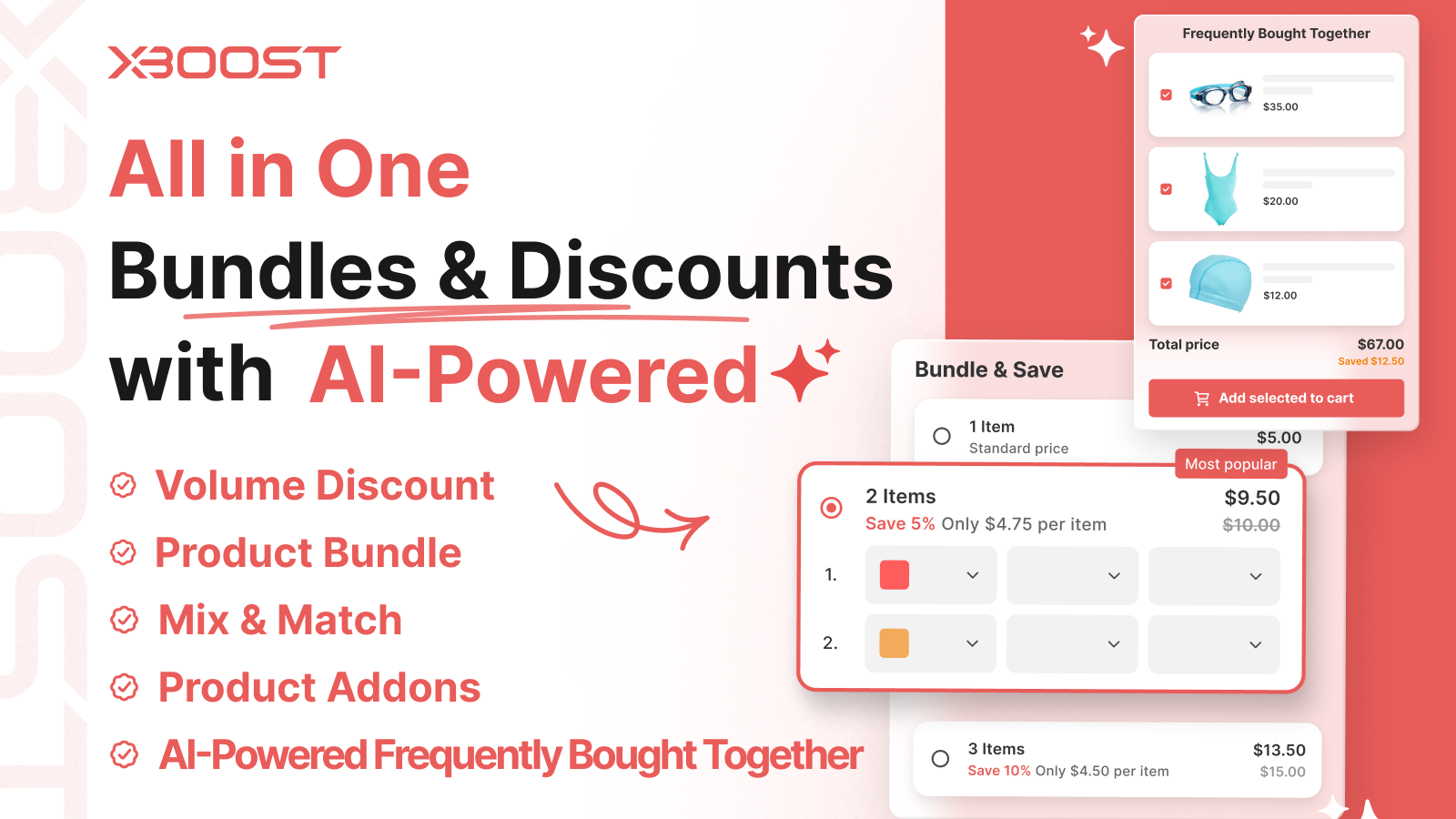
Key Features of XBoost Upsell (FREE)
✅ 1. Volume Discounts (Tiered Pricing)
Let customers see clear discounts such as:
- 1 pack = RM118
- 2 packs = RM220
- 3 packs = RM315 (save even more!)
Works perfectly for merchants selling supplements, skincare, snacks, or any product with repeat/bulk purchase behavior.
✅ 2. Product Bundle Creator
Create bundle offers like:
- “Buy 1 + Get 1 at 50% Off”
- “Family Bundle – 3 items for RMxxx”
- “Starter Pack – 4 items mix & match”
Bundles can be:
- From the same product
- Across multiple products
- Custom bundle sets
✅ 3. Mix & Match Builder
Customers can choose different variants or different products to build their own bundle.
Perfect for:
- Snack packs
- Gift sets
- Skincare routines
- Apparel packs (choose color/sizes)
✅ 4. Product Add-On / Add Extra Items
Add small upsell items directly on the product page:
- Extra gift box
- Add a sample pack
- Add accessories
- Add warranty/insurance
✅ 5. Built-In Multi-Currency Support
This is the best part for many merchants.
If your store serves:
- Malaysia + Singapore
- US + Europe
- International markets
The discount logic follows the converted currency properly — avoiding the common issue where bundle discounts break when currency is switched.
✅ 6. Fully Customisable CSS
You can edit the color, border, spacing, and fonts so the discount table or bundle widget matches your theme design perfectly.
For example:
- If you use Kalles, you can match their rounded buttons.
- For Minimog, you can match their clean minimalist UI.
- For Gecko/Ella, you can match their bold colour styles.
This makes the app blend seamlessly into your product page UI.
Why Shopjedi Recommends This App
Most volume/bundle apps on Shopify:
- Charge USD10–USD30 monthly
- Add heavy scripts that slow down stores
- Don’t work well with multi-currency
- Don’t integrate with draw-cart/mobile cart
- Don’t allow CSS edits
- Pop out ugly discount boxes that hurt UI
But XBoost Upsell solves all these issues while being completely FREE.
This makes it perfect for:
- New Shopify merchants
- Brands on a budget
- Stores needing simple clean bundle features
- Merchants selling consumables
- Multi-market stores needing currency support
We’ve tested it on multiple themes, and it works smoothly.
Examples of What You Can Do
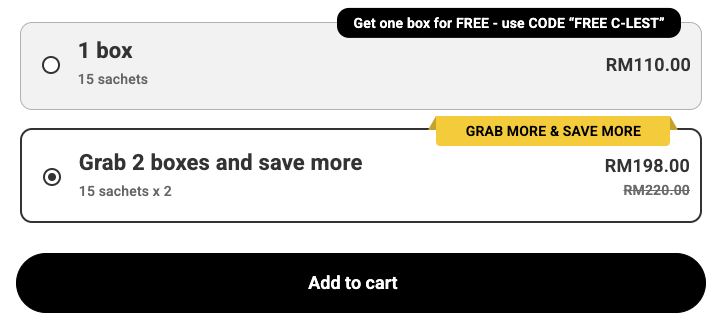
Here are a few real-world bundle setups we recommend to clients:
1. Tier Volume Discount (Supplements)
- 1 bottle — RM118
- 2 bottles — RM220
- 3 bottles — RM315
- 6 bottles — RM600 (big bundle savings)
2. Mix & Match Snack Packs
- Choose any 4 flavours
- Bundle price: RM39–RM49
- Customers love flexibility
3. Skincare Routine Bundle
- Cleanser + Toner + Serum
- Save 20% as a set
- Add gift box upsell for RM15
4. Apparel Packs
- Buy 2 tops → Save 10%
- Buy 3 tops → Save 15%
- Buy 5 tops → Save 25%
5. Add-On Gifts
- Add exclusive bag for RM5
- Add personalised note card
- Add trial-size versions
How to Install & Set Up (Quick Guide)
Step 1 — Install the App
Go to:
👉 https://apps.shopify.com/xboost-upsell
Click “Add App” and follow Shopify’s installation steps.
Step 2 — Choose Your Feature
Inside the app dashboard, select:
- Volume Discount
- Bundle
- Mix & Match
- Add-On
Step 3 — Configure Your Discount Logic
Example Volume Tier:
- Buy 1 → No discount
- Buy 2 → -10%
- Buy 3 → -15%
Step 4 — Match Your Theme (Optional)
Under the Design tab:
- Adjust colors
- Update font size
- Add custom CSS for perfect UI integration
- Hide borders or change to rounded design
Step 5 — Test Checkout
Make sure discounts appear correctly in:
- Cart
- Drawer cart
- Checkout
- Thank You page
And verify multi-currency pricing.
Final Thoughts: A Powerful FREE Option for Shopify Merchants
If your store needs bundle or volume discount features, XBoost Upsell is honestly one of the best free solutions available right now.
It offers:
✔ Professional bundle features
✔ Clean UI
✔ CSS flexibility
✔ Works with your Shopify theme
✔ Supports multiple currencies
✔ Zero monthly cost
At Shopjedi, we’ve already begun recommending it to merchants who want to boost AOV without adding more app expenses.
If you need help integrating, designing, or customizing this app to match your theme’s UI, feel free to reach out — we can set up the full system for you with a minimal one-time setup fee (RM500 / USD150).